How to See Who Unfollowed You on Instagram: What Actually Works
 Nikita T.7 min read
Instagram has no built-in "who unfollowed me" feature: the app doesn't send notifications about unfollows and doesn't keep a list of people who left. You can only find out who unfollowed you on Instagram indirectly: look up a specific person in your followers list, compare two exports of that list, or check the overall numbers in a professional account's insights. "Who unfollowed me" apps promise more, but they ask for your password and regularly end with your account being restricted. Below is what actually works on iPhone, Android and desktop, for free.
The short answer: Instagram doesn't show who unfollowed you
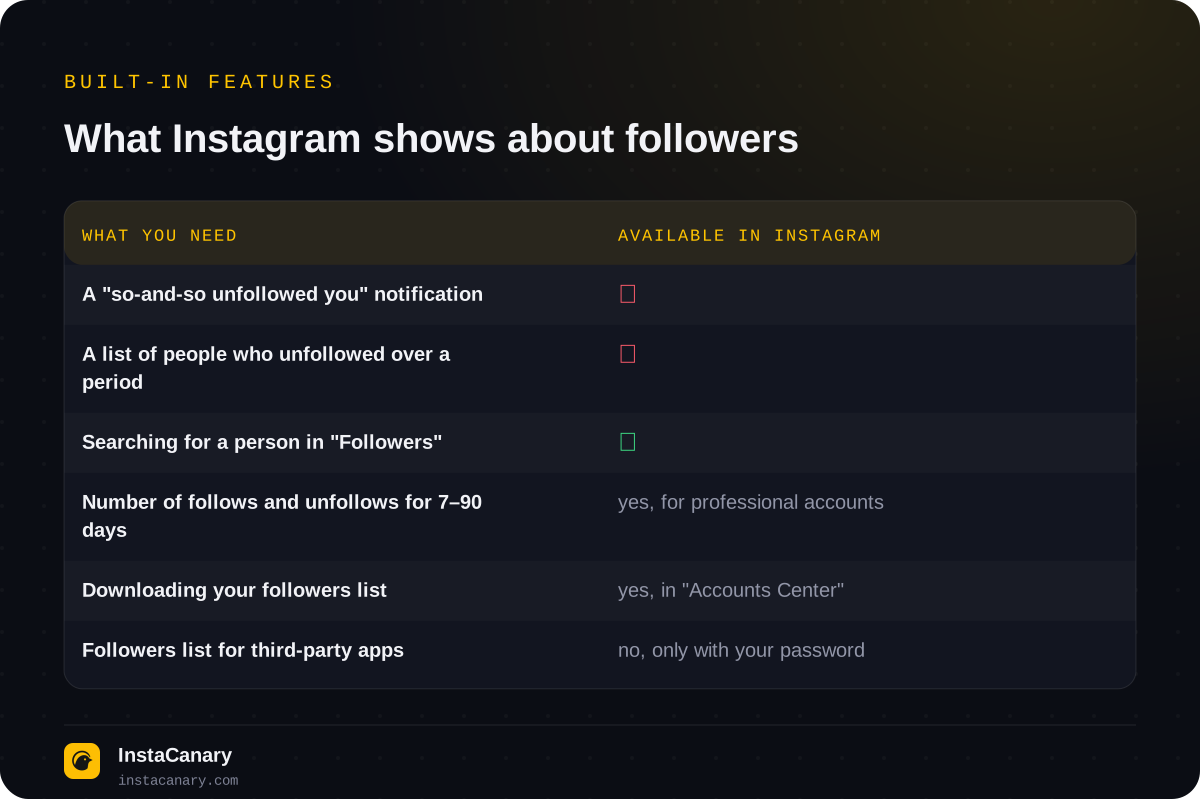
At the time of publication, Instagram has neither a "so-and-so unfollowed you" notification nor a section with your follower history. The followers list only shows the current state: who follows you right now. The app doesn't remember who was on it a week ago.
The only built-in number about unfollows is in a professional account's insights: how many people followed and unfollowed you over a period. There are no names there. And one more important detail: Instagram doesn't give your followers list to third-party services through an official interface. So every "who unfollowed me" app works the same way: it logs into your account with your password and downloads the list on your behalf.
How to check if a specific person unfollowed you
If you suspect one person, this takes a minute and needs nothing but the app.
- Open your profile and tap "Followers".
- Type the username in the search field above the list.
- If the profile shows up, the person follows you. If not, they unfollowed you, blocked you, or deleted or deactivated their account.
The second way is from their side: open the person's profile, tap "Following" and search for your username. For a public profile this always works; for a private one, only if you follow it. We covered the difference between what everyone can see and what's hidden in detail in the article "What You Can See on a Public Instagram Profile, and What's Hidden".
If you can't find the person's profile at all, even via a direct link, it's most likely not an unfollow: either you've been blocked, or the account has been deleted or temporarily deactivated.
How to find everyone who unfollowed you: compare two exports
For an account with hundreds or thousands of followers, going through the list by eye is pointless. A free method that works is to download your followers list from Instagram itself and repeat the download later.
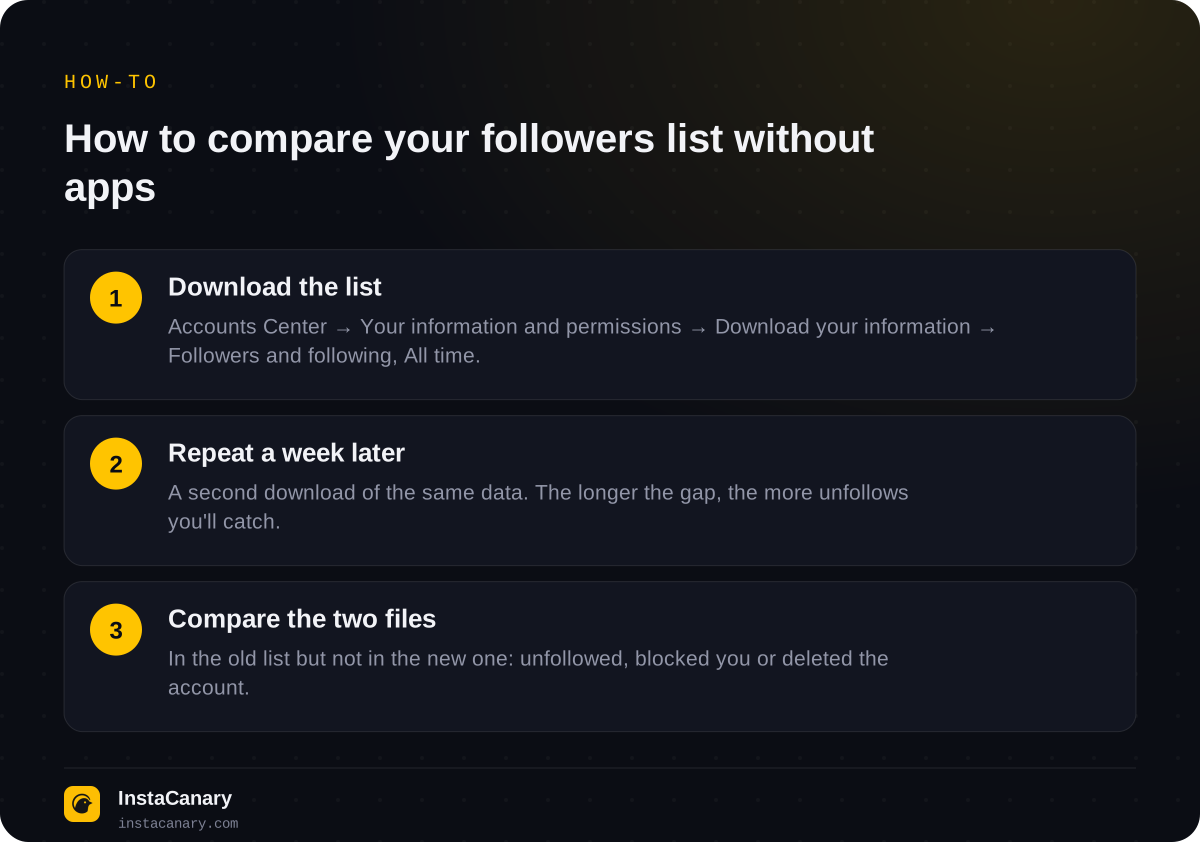
The path in the app: "Accounts Center" → "Your information and permissions" → "Download your information" (in some versions "Export your information") → choose the account → "Some of your information" → check "Followers and following" → date range "All time" → HTML format if you just want to read it, or JSON if you'll compare in a spreadsheet. Item names differ slightly between app versions and the website, but the section is the same. Instagram doesn't send the finished archive right away: usually within a few hours, sometimes longer.
Save the first file, make a second one a week or a month later, and compare them. Anyone who is in the old export and missing from the new one has unfollowed you. For a couple hundred names, it's enough to open both HTML files side by side; for thousands, it's easier to paste the lists from JSON into two spreadsheet columns and highlight the mismatches.
This method has a limitation: it only shows unfollows between two exports. Who left before the first one can no longer be found out, exactly as with any tracker app.
Professional account insights: numbers without names
If the trend matters more to you than specific names, switch your account to professional (it's free and reversible) and open "Professional dashboard" → "Insights" → "Total followers". There you'll find a growth chart and a "Follows and unfollows" block for 7, 14, 30 or 90 days.
This is handy for linking follower loss to an event: a spike in unfollows after a specific post or series of stories is visible right away. But who exactly left, insights don't tell you and won't: Instagram deliberately shows only numbers.
"Who unfollowed me" apps: why we don't recommend them
App stores have dozens of follower trackers for iPhone and Android. They all work the same way: they ask for your Instagram username and password, log into your account and periodically download your followers list, comparing it with the previous one. That's where all the problems come from.
- Your password goes to someone else's service. And with it, full access: follows, likes and messages in your name, changing your email, selling access. Reviews of such apps regularly mention a login from an unknown device right after installation.
- Instagram treats this as automation. A login from a third-party app and mass requests for the list look like a bot: first a warning about suspicious activity, then a temporary action block, and if it repeats, a restricted account. Since 2018, Instagram has directly asked people who gave such services access to change their password.
- They only show unfollows from the moment of installation. Nobody has retroactive data.
- Free quickly becomes paid. The basic feature is open, the list of people who left is behind a subscription; reviews are full of complaints about charges.
- They break after Instagram updates. A tracker runs on unofficial access, and any change on Instagram's side stops it.
If you've already used such an app, do three things: change your password, check the "Where you're logged in" and "Apps and websites" sections in "Accounts Center" and remove anything unfamiliar, and turn on two-factor authentication.
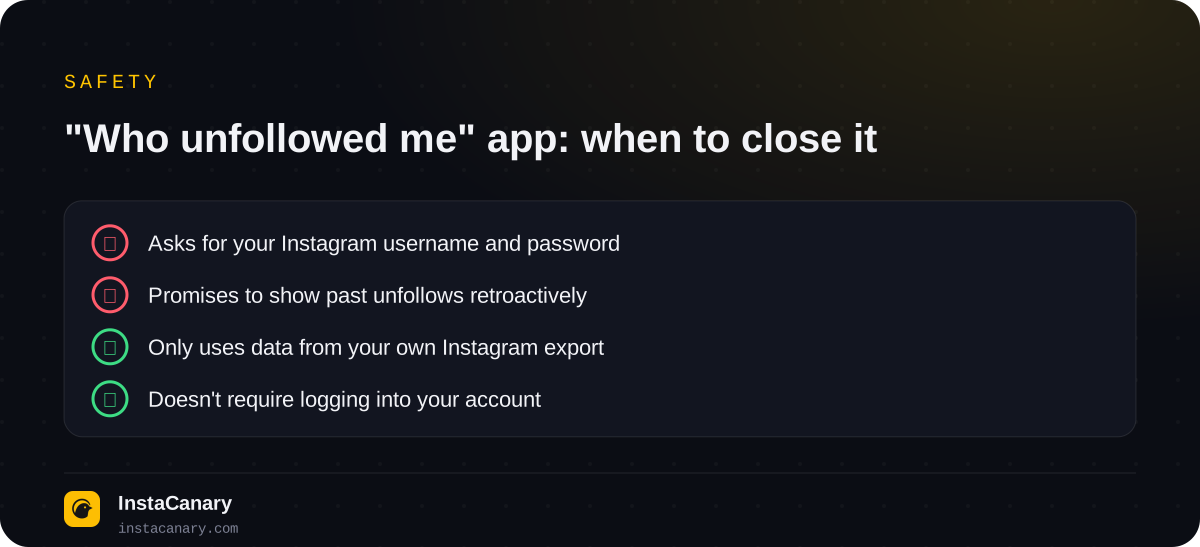
The same principle applies to story viewing services: a safe tool doesn't ask you to log into your account. We wrote about how to check such services in the article "Are Anonymous Instagram Viewers Safe to Use?"
Why your follower count dropped when nobody unfollowed
A falling count doesn't always mean real people left. Instagram regularly removes spam accounts and bots, and then many profiles lose followers at the same time, sometimes dozens. A person who blocked you also disappears from your followers and following, even though they never tapped "Unfollow". The same happens when an account is deleted or temporarily deactivated: once it comes back, that follower reappears. Finally, the count updates with a delay, and a difference of a few people over a day is normal.
Will someone know if you unfollow them
No. Instagram doesn't send notifications about unfollows, and it doesn't appear in the activity feed either. It can only be noticed manually: by the "Follow" button instead of "Following" on your profile, or by your absence from their followers list, using the same methods described above.
Two caveats. If the profile is private, after unfollowing you'll stop seeing its posts and stories, and to come back you'll have to send a new request, which its owner will see. And if you don't want to unfollow but just remove the person from your feed, there's a separate feature for that: on their profile, tap "Following" → "Mute" and choose posts, stories or both. They won't know about it.
How to watch a public profile's stories without following
Sometimes the question is different: you unfollowed a public profile or you're no longer among its followers, but you still want to look at its stories. You don't need to follow for that. Stories from public accounts can be viewed by username on the anonymous story viewer page: the request is made by the service, not your account, so you won't be in the viewers list. Why that is and when you do end up on that list, we explain in the article "Will Someone Know You Viewed Their Instagram Story?" This doesn't work for private profiles: their stories are visible only to followers.
The Telegram bot adds highlights, downloading stories and Reels, an archive of stories you've already seen, and notifications about new stories and posts from public profiles. Neither the site nor the bot needs your Instagram password for this.
Watch stories anonymously → @InstaCanaryBot
FAQ
Can you see who unfollowed you on Instagram without apps?
Yes. You can find a specific person by searching your "Followers" list. To see everyone who unfollowed you, download your followers list via "Accounts Center", repeat the download later and compare the two files.
Do you get a notification when someone unfollows you?
No. Instagram doesn't notify you about unfollows, neither with a push notification nor in the activity feed. Only your follower count changes.
How can I see who unfollowed me on iPhone or Android for free?
The same way on both platforms: search your followers list or compare two data exports from "Accounts Center". Both methods are free and don't need third-party apps.
Are "who unfollowed me on Instagram" apps safe?
No. They ask for your Instagram username and password, and Instagram treats their activity as automation. This can end in a temporary action block or a restricted account, and your password ends up with someone else's service.
Will someone know if I unfollow them?
No, Instagram doesn't send unfollow notifications. It can only be noticed manually, by checking the followers list or the button on your profile.
Why did my follower count drop if nobody unfollowed me?
Instagram periodically removes spam accounts and bots. Also, people who blocked you, deleted or temporarily deactivated their account disappear from your followers.
Read also
- How to See Deleted Instagram StoriesHow to recover your own deleted stories from the "Recently deleted" folder, and how to see someone else's deleted stories.
- Best Anonymous Instagram Story Viewers in 2026A comparison of the most visible anonymous story viewing services: what's free, which ones have an archive of deleted stories, downloading and tracking.
- Can You See Who Viewed Your Instagram Story?What Instagram really shows about your story viewers, whether you can find out who visited your profile, and why that's a myth.