Does Instagram Notify When You Screenshot a Story?
 Sergey D.6 min read
No. If you screenshot someone's Instagram story or screen record it, Instagram won't tell the author: no notification, no icon in the viewers list. There's only one place where you get a screenshot notification: in DMs, when someone sent you a disappearing photo or video, or when you're chatting in vanish mode. Below we'll cover where the line is, where the "star icon" myth came from, and what the author actually can see.
Short answer: the author can't see a story screenshot
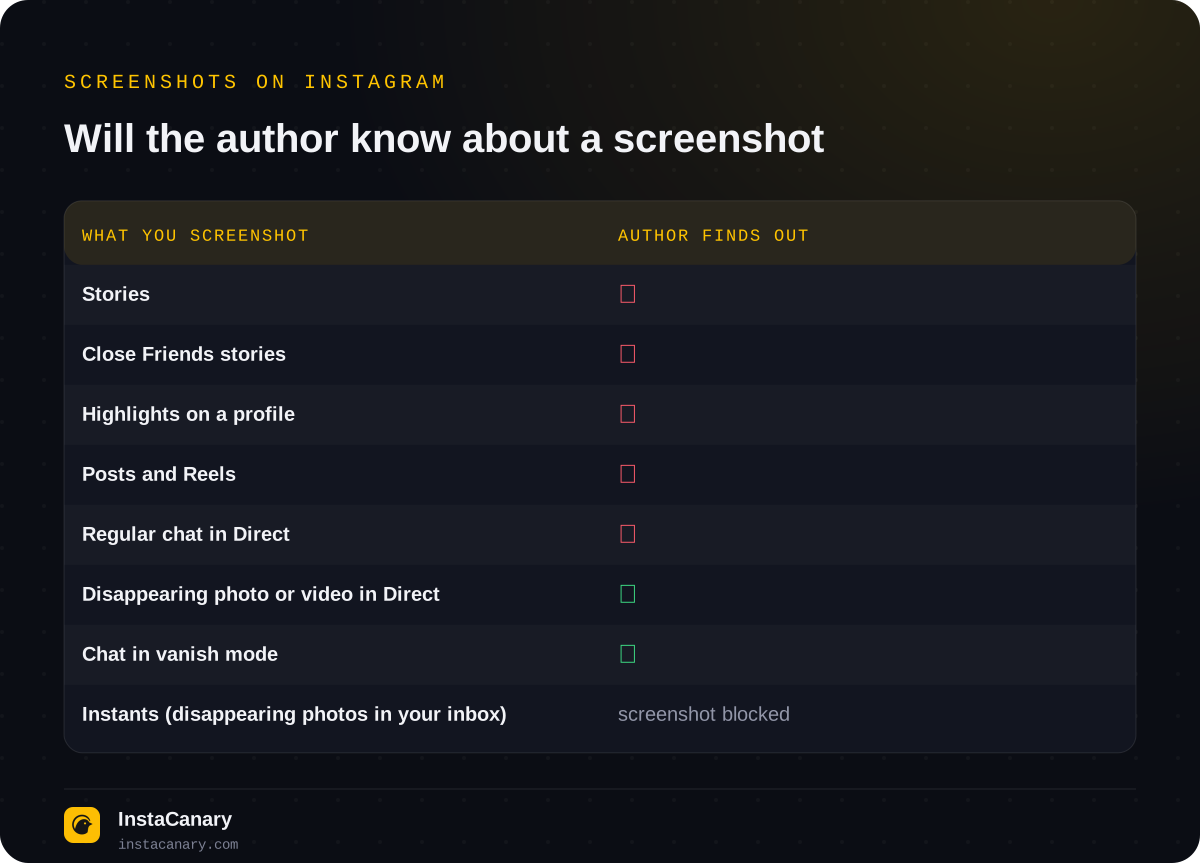
Stories, Close Friends stories, Highlights on a profile, posts and Reels can all be saved with a screenshot or a screen recording. Instagram doesn't track this and doesn't show it to anyone. That applies on both your phone and your computer.
There's one important catch, though: the author does see that you viewed the story. If you opened it from your account, you're in the viewers list for 24 hours, whether you took a screenshot or not. So a "silent" screenshot doesn't make your visit silent. We go into detail in Will Someone Know You Viewed Their Instagram Story?
Where Instagram does notify about screenshots
Screenshot notifications only exist in Direct, and only for content that's meant to disappear.
Disappearing photos and videos. When someone sends you a photo or video set to "View once" or "Allow replay" and you take a screenshot or screen recording, the sender will see it: a screenshot label appears next to the message.
Chats in vanish mode. If you're chatting in vanish mode (messages disappear after you close the chat), a screenshot won't go unnoticed either: Instagram shows a notification in the conversation. Instagram's Help Center says so directly. In some countries and for some professional accounts the mode may be unavailable, and in newer versions of the app it's gradually giving way to disappearing messages, but the screenshot notification logic stays the same.
Regular chats. Screenshotting regular messages, photos from someone's camera roll or shared posts in Direct doesn't trigger any notification.
Instants: photos you can't screenshot at all
In May 2026 Instagram launched Instants worldwide: disappearing photos you send straight from your inbox, to all your friends or just your close friends. The photo disappears after it's viewed, it has no viewers list, and only the sender sees replies and reactions.
These follow different rules. According to Instagram, the recipient can't take a screenshot or screen recording of an Instant: the app simply won't let you save the image, so there's nothing to notify the sender about. Keep in mind that this restriction only works inside the app on the phone and doesn't stop someone from photographing the screen with another device. So the usual rule of caution still applies: don't send anything as a disappearing photo that you wouldn't be okay with someone saving.
If you sent an Instant by mistake, an "Undo" button appears under the shutter button for a few seconds right after sending. Later you can delete the photo from your Instants archive, and it will disappear for anyone who hasn't opened it yet. And if you don't want Instants at all, you can hide them from your inbox in your content settings.
If you accidentally screenshot a disappearing photo
Sometimes your fingers hit the buttons on their own while a disappearing photo or video is open in Direct. In that case the sender will see the screenshot label. Instagram has no way to take it back, and deleting the screenshot from your gallery changes nothing.
The best thing you can do is send the person a quick message saying the screenshot was an accident, and delete it. That's more honest and less awkward than pretending nothing happened: the label stays in the chat, and the question may come up anyway.
Screenshots on a computer: same rules
The same logic applies to Instagram on the web. You can screenshot stories, posts, Reels and profiles, and the author won't know: Instagram doesn't track screenshots on either phone or computer. Screenshot notifications are only tied to disappearing content in Direct.
Viewing stories on a computer works exactly like on a phone, though: if you're logged into your account, you end up in the viewers list.
Where the notification myth came from
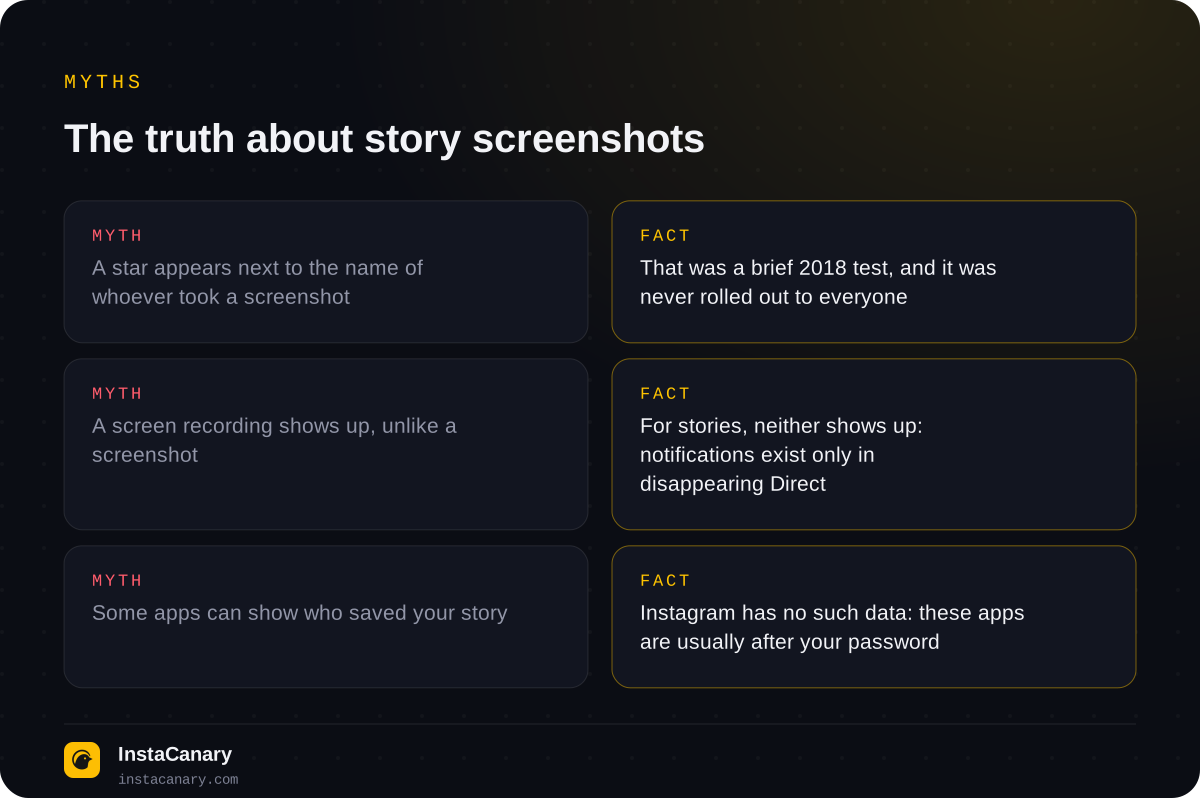
In 2018 Instagram tested story screenshot alerts: some users saw a small icon next to a viewer's name if that viewer had taken a screenshot. The test was short and ended without a wide rollout. But talk about the "star in the viewers list" lives on, and a lot of advice online is still based on it.
The second source of confusion is Snapchat. It does notify about screenshots of snaps and stories, and many people assume Instagram works the same way. In reality Instagram has its own model: notifications only for disappearing content in Direct.
What the story author actually sees
The author sees a list of everyone who opened their story, for 24 hours while the story is live.
If the author has a professional account, story insights show them reach, replies, link and sticker taps, forward and back taps, and exits from the story. Screenshots are not among these metrics, neither per person nor as a total.
The author also sees everything you do explicitly: a reply to the story (it goes to Direct), a reaction, a story like, a tag in a reshare. But a screenshot, a screen recording or a photo of the screen taken with another phone, no.
Third-party "see who screenshotted your story" apps
App stores and ads are full of services promising to show who saved your stories or screenshotted your profile. That's impossible: Instagram doesn't pass this data to the author or to third-party services. The data simply doesn't exist.
These apps usually ask you to log in with your Instagram username and password. At best you'll get a random list of followers; at worst you'll lose access to your account. Don't enter your Instagram password into third-party services. We covered how to tell a safe tool from a trap in Are Anonymous Instagram Viewers Safe to Use?
Screenshot or saving: which to choose
A screenshot is fine for quickly keeping an image or some text. But it has downsides: quality drops, interface elements end up in the picture, and with videos and stories that have music, a screen recording often saves with no sound or with system sounds.
If you want the story itself in its original quality, the whole photo or video, it's more convenient to save it as a file. We explain how to do it for stories, Reels and posts in How to Download Instagram Stories, Reels and Photos.
And remember the ethics: just because Instagram doesn't report screenshots doesn't mean you're free to post other people's photos. Save them for yourself, and ask the author before reposting.
How to watch and save stories without appearing in the viewers list
Since a screenshot doesn't give you away but viewing does, the logical question is: can you watch stories without ending up in the viewers list at all? Yes, with anonymous viewing. The service sends the request to the public profile, not your account, so the author won't see you among the viewers. Try it with our anonymous story viewer: just enter a username. It only works for public profiles; stories from private accounts are visible only to their followers.
If you want more than viewing, such as downloading stories in original quality and a story archive, our Telegram bot has that too.
Watch and save stories anonymously → @InstaCanaryBot
FAQ
Can you screenshot Instants on Instagram?
No. According to Instagram, the recipient can't take a screenshot or screen recording of an Instant: the app blocks it. It doesn't protect against photographing the screen with another phone.
Will someone know I screenshotted their story?
No. Instagram doesn't notify the author about screenshots or screen recordings of stories, including Close Friends stories and Highlights.
What if I screen record a story instead of taking a screenshot?
For stories it makes no difference: the author can't see either a screenshot or a screen recording.
When does Instagram notify about a screenshot?
Only in Direct: if you screenshot a disappearing photo or video, or a chat in vanish mode.
Can people see if I screenshot a post or a Reel?
No. Instagram doesn't track screenshots of posts, Reels or profiles.
Can I find out who screenshotted my story?
No. Instagram doesn't collect or show that data. Apps that promise it don't work and often ask for your account password, so don't enter it.
Read also
- How to See Who Unfollowed You on Instagram: What Actually WorksThere's no built-in feature. How to check a specific person, compare two exports of your followers, what insights show and why "who unfollowed me" apps are dangerous.
- How to See Deleted Instagram StoriesHow to recover your own deleted stories from the "Recently deleted" folder, and how to see someone else's deleted stories.
- Best Anonymous Instagram Story Viewers in 2026A comparison of the most visible anonymous story viewing services: what's free, which ones have an archive of deleted stories, downloading and tracking.