How to Tell If Someone Blocked You on Instagram
 Sergey D.8 min read
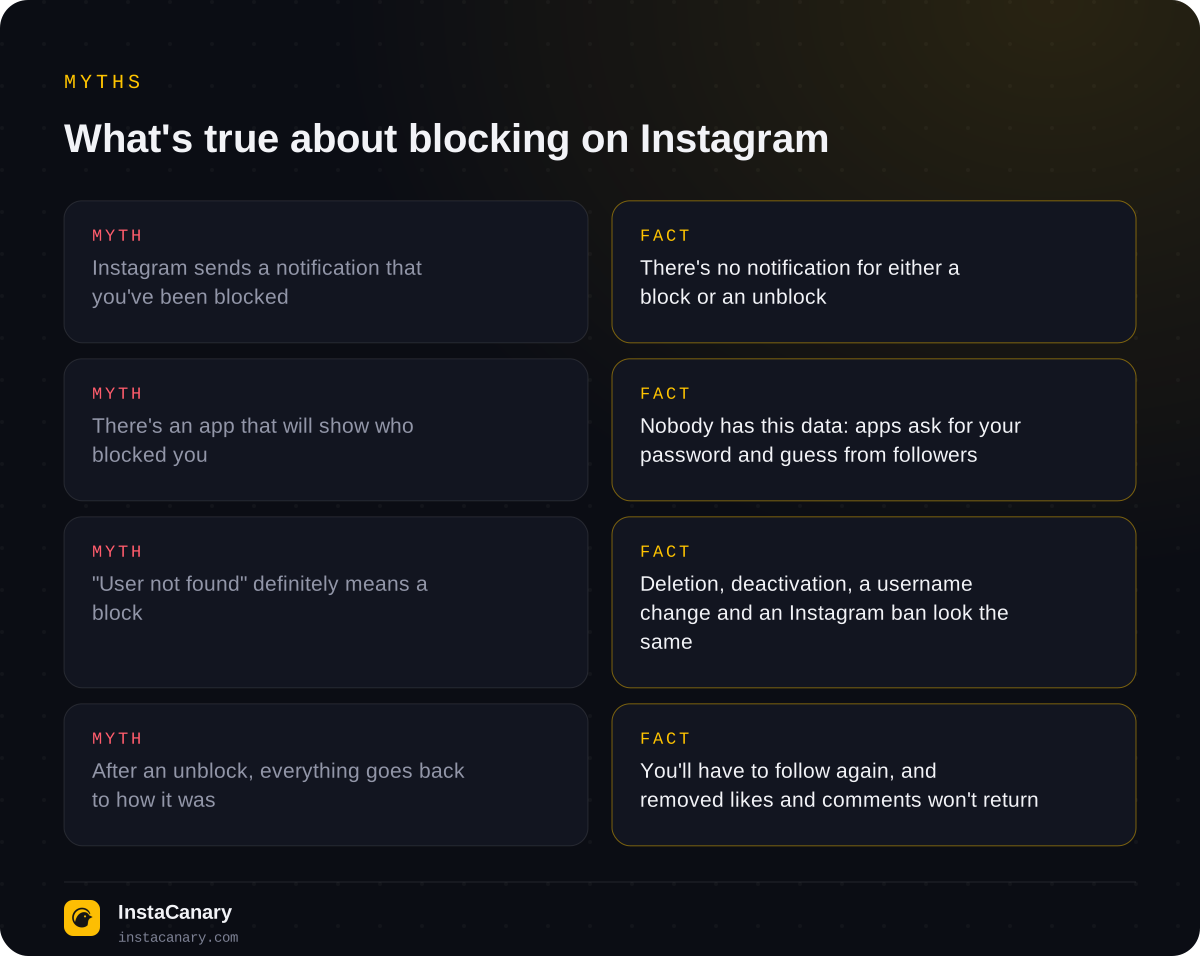
Instagram doesn't tell you that you've been blocked: there's no notification, and the app has no "who blocked me" list. You can only tell that someone blocked you on Instagram from a combination of signs: the person's profile has disappeared from search, a direct link opens an empty page or "User not found", you've vanished from their followers, and you can no longer message them in Direct. The key is to tell a block apart from a deleted, deactivated or restricted account. Below are the signs, a reliable one-minute check, and what the blocked person sees.
Short answer: there's no block notification
The Instagram Help Center states plainly that people aren't notified when you block them (help.instagram.com). It works both ways: you won't be told if someone blocked you, and the other person won't find out if you block them.
So any check is indirect. A single sign proves nothing on its own: "User not found" also appears after a username change, after an account is deleted, and after a ban by Instagram. Only a combination of signs plus a look at the profile from the outside gives a reliable answer.
Signs someone blocked you on Instagram
If someone has blocked you, this is usually what you see from your account:
- The profile doesn't show up in search. You type the exact username, but it's not in the results, even though it used to be.
- A direct link leads nowhere. Depending on the app version, you get "User not found" or a profile with no profile picture, the text "No posts yet" and zeros in the counters.
- You've disappeared from each other's followers and following. A block automatically removes the follow on both sides, even though nobody tapped "Unfollow".
- Likes and comments are gone. Their likes and comments on your posts are removed.
- You can't message them in Direct. The old conversation stays, but a new message won't send, and you can't open the other person's profile from the chat.
- You can't tag them. When you try to mention the person in a post or story, their username doesn't come up.
Shared group chats don't disappear, though: a block doesn't remove anyone from shared conversations, so you may keep seeing their messages in the group. That doesn't disprove the block.
How to tell if they blocked you or deleted their account
Almost all the signs above look the same whether you've been blocked or the person deleted or temporarily deactivated their account. One check tells them apart: look at the profile from an account other than your own.
- Ask a friend to open the profile by username, or find it from a second account.
- Or open the profile without logging in to Instagram, for example by entering the username in an anonymous viewer or in a browser in incognito mode.
- The profile is visible from the outside but not to you: you've been blocked. It isn't visible to anyone: the account has been deleted, deactivated or banned by Instagram itself.
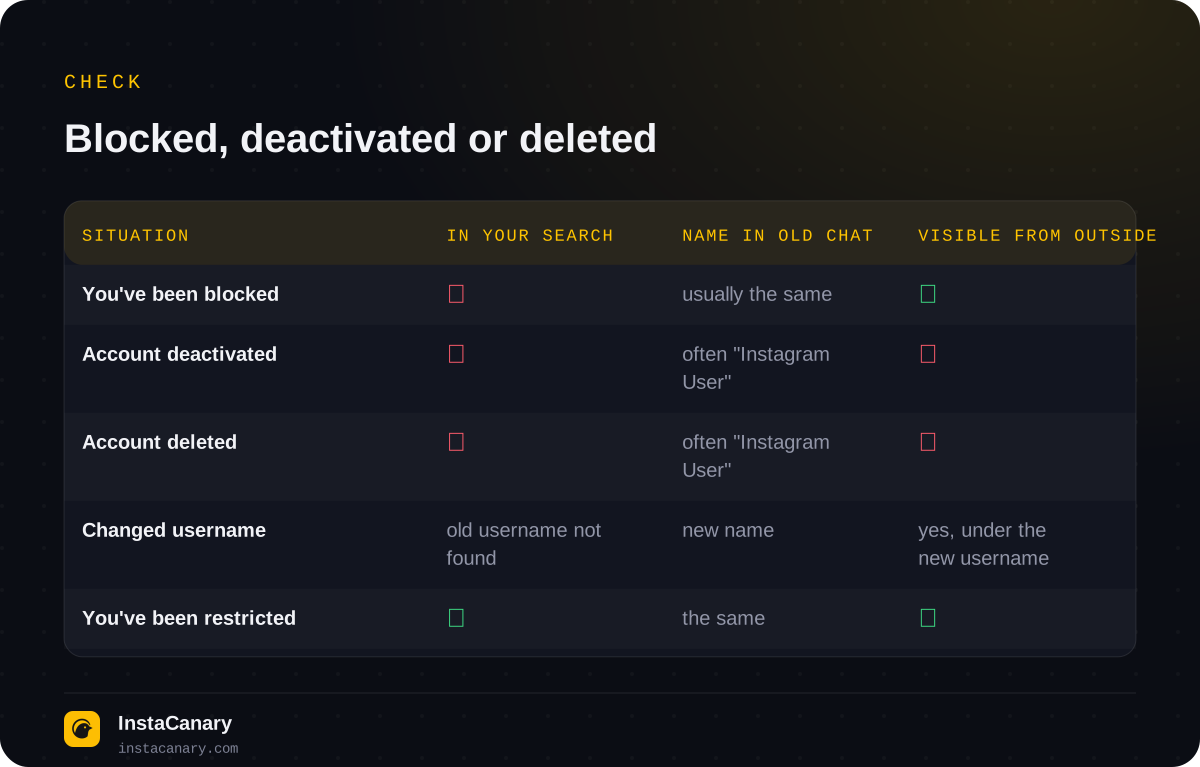
There's also an extra clue in Direct. When an account is deactivated or deleted, old conversations often show "Instagram User" and a gray profile picture instead of the name. With a block, the person's name in the chat usually stays the same. The sign isn't foolproof, as the interface changes from version to version, but combined with the outside check it gives a confident answer.
And one last possibility: the person may simply have changed their username. Then the old username is "not found" for everyone, while the profile under the new name carries on as usual. You can check this through mutual friends or in your old conversation, if it opens.
Blocked or restricted: what's the difference
Instagram has a softer feature called "Restrict". It's often confused with blocking, even though it looks completely different. If someone restricted you, their profile is visible, the follow stays, and you can send messages and comment. But:
- your new comments on their posts are visible only to you until they approve them;
- your messages go to their message requests, and they can read them without you seeing "Seen";
- their activity status ("Active now", "Active 1h ago") disappears for you.
The problem is that a person can also turn off their activity status and read receipts themselves, for everyone. So it's almost impossible to prove a restriction from your side: the most you can do is ask a friend to check whether your recent comment under their post is visible. If it isn't, you've most likely been restricted.
Can you see a list of who blocked you
No. Instagram has no such section, and third-party services don't have this data either. "Who blocked me" apps work the same way as unfollower trackers: they ask for your username and password, log in to your account and, at best, compare follower lists. They can't see blocks, but they do get your password. We wrote about where that leads in the article "Who unfollowed me on Instagram".
You can indirectly tell that a specific person has gone the same way: if someone disappeared from your followers and following at the same time, and their profile is visible to others, that's a block.
What the blocked person sees
If you block someone, here's what changes for them:
- your profile doesn't show up for them in search, and a link opens an empty page or "User not found";
- your posts, stories and Highlights aren't available to them while they're on their account;
- they no longer follow you, and you no longer follow them;
- their likes and comments on your posts disappear and won't come back after you unblock them;
- they can't message you in Direct, but they can see the old conversation.
They won't get a block notification. They can only find out from the same indirect signs described above. When you block someone, Instagram also offers to extend the block to the person's other accounts, including new ones they may create, which helps if someone keeps coming back with new profiles.
A block only works within your account: the person can see your public profile from a second account or without logging in. Everything you post on a public profile is public. What exactly a stranger can see is covered in the article "What a public Instagram profile shows". If you want to hide your posts from all strangers, only a private account helps.
Will they know if you unblock them
No, there's no unblock notification either. After you unblock someone, your profile shows up in their search again, and they can message you again. But the follow doesn't come back on its own: you'll both have to follow each other again, and the likes and comments removed by the block won't return. If your profile is private, the person will have to send a new follow request.
What to do if you've been blocked
A block is another person's deliberate decision, and you can't dispute it within Instagram. If it's a mistake or a misunderstanding, the best way is to ask through mutual friends or in another messenger, rather than creating new accounts: Instagram may treat repeated attempts to contact someone after a block as harassment, and the person can block new profiles in advance.
If you're not sure it's a block, check your own account. Sometimes the problem is on your side: Instagram may have temporarily limited your actions for suspicious activity, in which case messages and comments won't send to anyone, not just to one person.
How to check a public profile without logging in
To find out whether an account exists and whether it's public, you don't have to ask friends. You can find a public profile by username on the story viewer with no registration page: if the profile is found, the account is alive and public, and the "deleted or blocked" question is settled. The service makes the request on its own behalf, so you're not on the viewers list; we explained how it works in the article "Will someone know you viewed their Instagram story?". Private profiles can't be checked this way: their content is visible only to their followers.
In the Telegram bot, you can watch stories and Highlights from public profiles, download stories and Reels, and get notified about new posts. You don't need your Instagram password.
Watch stories anonymously → @InstaCanaryBot
FAQ
Do you get a notification if someone blocks you on Instagram?
No. Instagram doesn't notify you about blocks or unblocks. You can only tell from indirect signs: the profile has disappeared from search, the follow is removed, and you can't message them in Direct.
How do you tell a block apart from a deleted account?
Look at the profile from the outside: from a second account, from a friend's phone or without logging in to Instagram. If the profile is visible there but not to you, you've been blocked. If it isn't visible anywhere, the account has been deleted or deactivated.
Does the Direct conversation stay after a block?
Yes, the old messages usually stay for both of you, but you can't send new ones. Shared group chats are kept too.
Will likes and comments come back after an unblock?
No. Likes and comments removed by the block aren't restored. The follow also has to be set up again after an unblock.
Can a blocked person see my stories?
Not from their own account: your posts, stories and Highlights aren't available to them. But a public profile is public, and it can be seen from another account or without logging in. Only a private account can hide your posts from all strangers.
Read also
- Does Instagram Notify When You Screenshot a Story?Will the author know you screenshotted or screen recorded their story, where Instagram does notify about screenshots, how Instants work, and where the "star icon" myth came from.
- How to See Who Unfollowed You on Instagram: What Actually WorksThere's no built-in feature. How to check a specific person, compare two exports of your followers, what insights show and why "who unfollowed me" apps are dangerous.
- How to See Deleted Instagram StoriesHow to recover your own deleted stories from the "Recently deleted" folder, and how to see someone else's deleted stories.