Can You See Who Viewed Your Reels on Instagram?
 Sergey D.7 min read
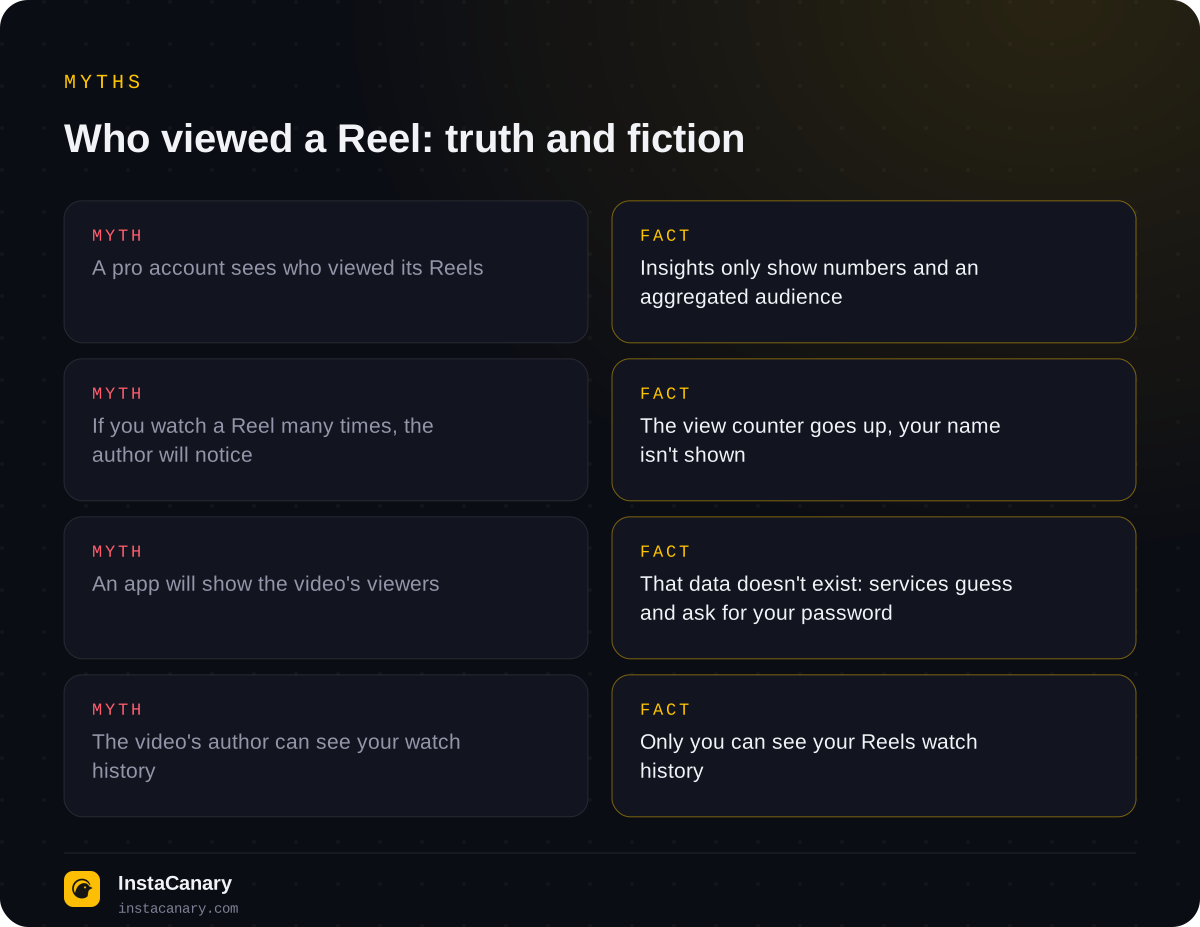
No, on Instagram you can't see who viewed your Reel: Reels have no viewers list, for either personal or professional accounts. The author only sees the number of views, and in insights they see reach, likes, comments, saves and shares, but no names. Instagram only has a "who viewed" list for stories, and even then only for 48 hours. Below: what exactly a Reels author sees, which of your actions are still noticeable, and why "who viewed my Reel" apps are a scam.
Short answer: nobody can see who viewed a Reel
You can't see who viewed a Reel on Instagram, whether it's yours or someone else's. Under the video there's only a view counter, and in the insights section there are only anonymous numbers. The same goes for regular videos in the feed, photos and carousels: posts on Instagram have no viewers list at all.
The reason lies in how Reels work. Stories are seen first and foremost by your followers, so showing them by name makes sense. Reels, on the other hand, are recommended by Instagram to strangers in the Reels tab and in Explore: thousands of random accounts can watch a video, and a list of those viewers would be meaningless and would violate their privacy.
For the viewer, this is good news. If you simply watched someone's Reel, once or ten times, the author won't find out it was you. Your view adds one to the counter, and that's it.
What the author sees about Reels views
The owner of the video gets two groups of data.
View count. The number under the Reel is visible to everyone who opens the video. Repeat views by the same person are counted too, so the number of views is usually higher than the number of viewers.
Insights. Professional accounts (creators and businesses) have a "View insights" button under each video. It shows:
- views and accounts reached: how many unique accounts saw the video on screen at least once, even if it didn't have time to play (help.instagram.com);
- likes, comments, saves and shares, as numbers;
- average watch time and how many watched to the end;
- the share of followers and non-followers among viewers, and aggregated audience data: countries, cities, age, gender.
The insights don't contain the name of a single viewer. Demographics are built by groups, and if three people from the same city watched the video, the author will see the city but not the people. Instagram changes the set of metrics and their names from time to time, but the principle stays the same: numbers without lists.
How to see insights for your Reel
If you want to understand who your audience is, this is the most Instagram gives you. The path is the same on iPhone and Android:
- Open your profile and go to the Reels tab.
- Choose a video and tap "View insights" under it (or open the "…" menu on the video).
- Look at views, reach, interactions and the audience section.
If there's no insights button, you most likely have a personal account. You can switch to a professional one for free in settings, in the account type section. Keep in mind that insights are generally collected for posts published after the switch, and the account overview covers up to the last 90 days. Viewer names won't appear after switching either.
Why can there be more views than followers? Reels are shown in recommendations to people who don't follow you. That's why a Reel's insights usually show a noticeable share of non-followers: this is normal, and it shows how far the video went beyond your audience.
How Reels differ from stories
The confusion comes from the fact that stories really do have a viewers list. The author of a story sees who opened it for 48 hours after posting; we break down the mechanics in detail in Can You See Who Viewed Your Instagram Story?
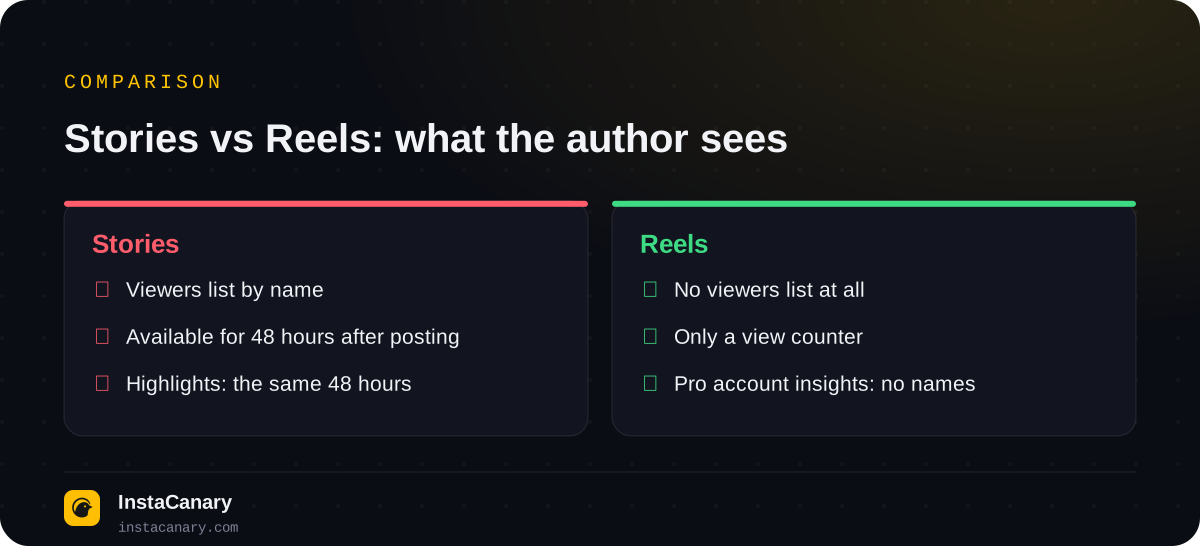
There's a borderline case: the author can share their Reel to their story. Then they'll see who opened that story, but those are the story's viewers, not the video's. Someone who watched the Reel in the feed or in the Reels tab won't be on that list.
Highlights follow the same rule as stories: viewers are visible only for 48 hours from when the original story was posted. If a story is added to highlights later, new viewers are no longer shown by name.
Which of your actions on Reels the author can see
Viewing is anonymous, but active actions aren't. This is where most accidental slip-ups happen.
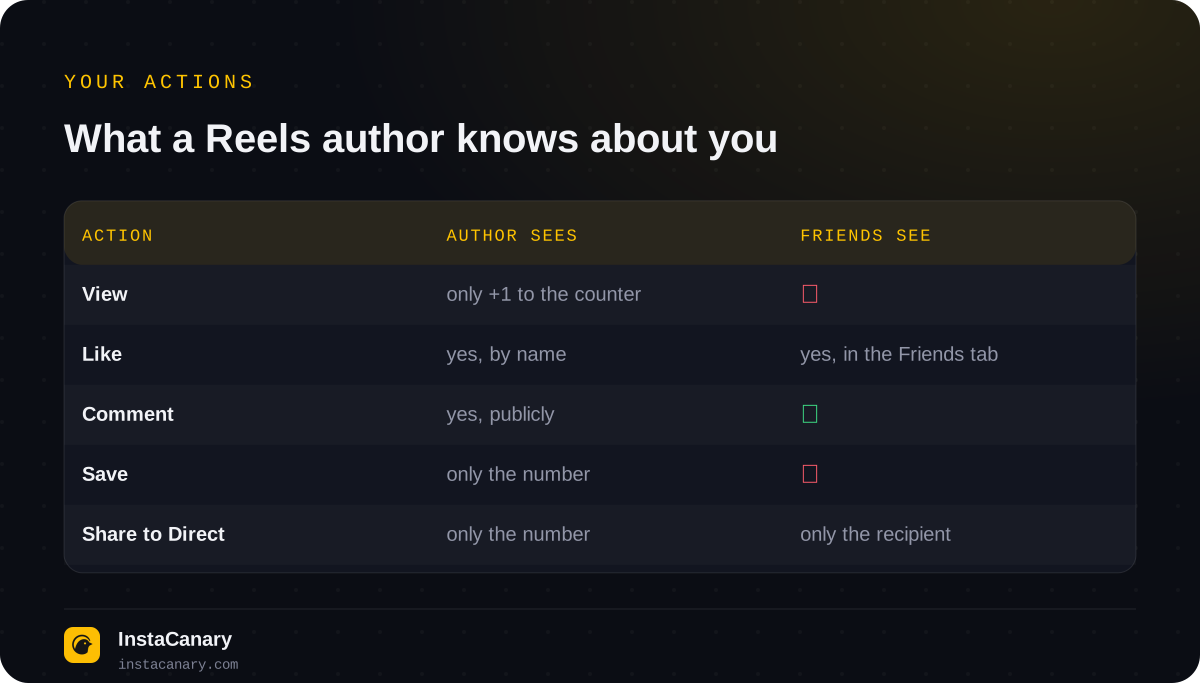
- Like. The author sees who tapped "Like", even if they've hidden the like count themselves.
- Comment. Visible to everyone under the video.
- Save. The author only sees the number of saves, without names.
- Sharing to Direct. The author sees the number of shares but doesn't know who sent the video to whom. The recipient, of course, sees that you were the one who sent it.
- Reposting and sharing to your story. A repost shows up on your profile, and when you share it to your story, the author of the video usually gets a notification or sees a mention.
It's also worth remembering the "Friends" tab in Reels, which Instagram launched in 2025. It shows your mutual followers the Reels you've liked or commented on (about.instagram.com). Views don't end up there, but a like given "out of habit" will be seen by people you know. You can hide this in settings: in the "Who can see your content" section, find the item about activity in the Friends tab and choose "No one". Item names may differ slightly between app versions.
Can you see who viewed a video, photo or post
No. Regular feed posts (photos, videos, carousels) follow the same rule as Reels: only counters, plus insights for professional accounts. Whether you can see who viewed a post, a profile or opened a page: no, in no version of the app, and this is one of the most common myths. We covered what a stranger can see on your profile in What You Can See on a Public Instagram Profile.
Can you see the Reels you've watched
Your own, yes. Since October 2025 Instagram has had a Reels watch history: open your profile → menu → "Your activity" → "Watch history". It collects the videos you've watched, even if you didn't like or save them. You can sort the list by date, filter it by period and author, and delete individual videos from the history.
Only you can see this history. The author of a video has no access to it, and it isn't connected to their Reels insights in any way. You can't see someone else's watched videos: a person's watch history is available only to them.
"Who viewed my Reel" apps are a scam
Since there's no built-in list, third-party services and bots promise one. They can't get this data: Instagram simply doesn't have it in open form, and the official API doesn't provide such a list either. What these apps almost always do is ask for your account login and password, and after that come spam sent in your name, the sale of your account or a demand to pay for a "full report". How to check a service before using it is explained in Are Anonymous Instagram Viewers Safe to Use?
If a service shows a "viewers list" for your video, it's most likely your followers or the people who liked it, in random order. It's easy to check: the "list" will include people who definitely never opened the video.
How to watch Reels and stories without leaving a trace
With Reels it's simple: just watch and don't tap anything, don't like it and don't send the video. Stories work differently: as soon as you open a story from your account, you end up on the viewers list for 48 hours. Why this happens and how to avoid it is explained in Will Someone Know You Viewed Their Instagram Story?
You can view stories from public profiles without an account on the anonymous story viewer page: the request is made by the service, so the author doesn't get your name. Private profiles can't be opened this way: only their followers can see them.
In the Telegram bot you can view stories and highlights from public profiles, download stories and Reels in original quality and get notifications about new posts. You don't need your Instagram password.
Watch stories anonymously → @InstaCanaryBot
FAQ
Will the author know if I rewatch their Reel many times?
No. Each repeat view adds one to the counter, but the viewer's name isn't shown to the author, either in the counter or in insights.
Can a professional account see who viewed its Reels?
No. Insights for creator and business accounts show views, reach, interactions and aggregated audience data, but not a list of specific viewers.
Can I see who saved or shared my Reel?
No, insights only show the number of saves and shares. The names of people who saved the video or sent it in Direct aren't shown.
If I share my Reel to my story, will I see the viewers?
You'll see who opened that story for 48 hours. But those are the story's viewers, not the video's: people who watched the Reel in the feed or in the Reels tab won't be on the list.
Who can see my Reels watch history?
Only you. Your watch history is in the Your activity section of your profile, and video authors and followers have no access to it.
Read also
- How to Tell If Someone Blocked You on InstagramThere's no block notification. The signs, a one-minute check, how a block differs from a deleted, deactivated or restricted account, and what the blocked person sees.
- Does Instagram Notify When You Screenshot a Story?Will the author know you screenshotted or screen recorded their story, where Instagram does notify about screenshots, how Instants work, and where the "star icon" myth came from.
- How to See Who Unfollowed You on Instagram: What Actually WorksThere's no built-in feature. How to check a specific person, compare two exports of your followers, what insights show and why "who unfollowed me" apps are dangerous.