How to See Watched and Liked Videos on Instagram
 Sergey D.7 min read

Yes, you can see the videos you've watched on Instagram: since October 2025 the app has had a "Watch history" for Reels. It sits in the "Your activity" section of your profile, in the same place as the list of videos and posts you've liked. Both features show only your own activity: Instagram doesn't open anyone else's watched or liked videos to anybody. Below are step-by-step paths to find a Reel you watched recently, where to look for your likes, how to clean up these lists and what you can find out about your friends' likes.
How to see your watched videos on Instagram
Watched videos are collected in "Watch history". Instagram launched it at the end of October 2025 so you can get back to a Reel you scrolled past by accident and didn't save. At the time of publication the path in the app is:
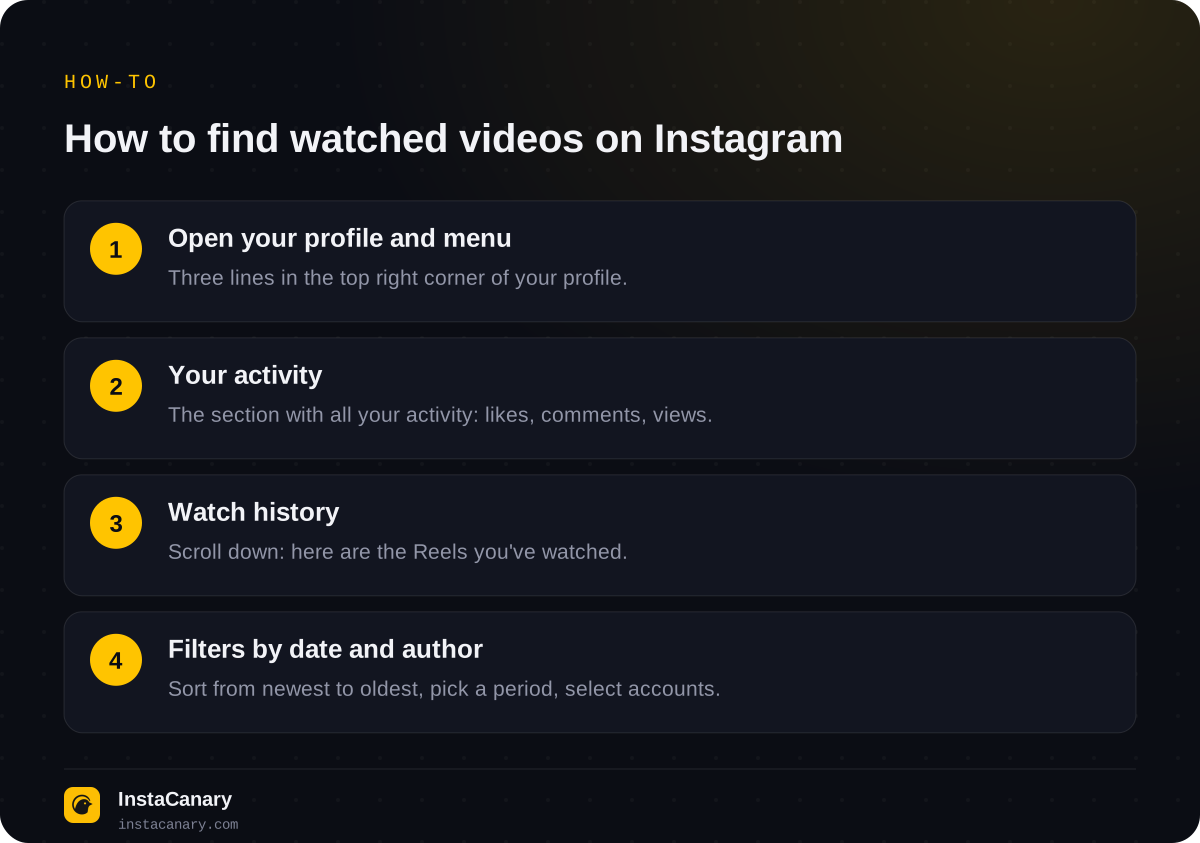
- Open your profile and tap the three lines in the top right corner.
- Select "Your activity".
- Scroll down to "Watch history".
- Find the video you need in the list and open it.
The history includes videos you watched even if you didn't like, comment on or save them. This is the main difference from likes and "Saved": a video only ends up there after you take an action, while it lands in the history just by being watched.
If there's no "Watch history" item, update the app first. Instagram rolls out new features gradually, and older versions may not have the section.
How to find a Reel you watched recently
You can sort the list by the date you watched: newest to oldest or the other way round. To find a video you watched recently, just keep the "newest first" sorting and scroll through the top of the list.
If you remember roughly when it was, the date filter helps: "Past week", "Past month" or a custom date range. And if you remember the creator, tap the authors filter and select one or more accounts: only their videos will remain.
Keep in mind that the history isn't endless. At launch Instagram head Adam Mosseri said you could see every Reel you'd ever watched, but after launch reviews and users reported that the list covers roughly the last 30 days. So if you like a Reel, it's safer to save it right away: "Saved" keeps a video until you remove it yourself.
Can you delete your watch history?
Yes, but one video at a time. Tap "Select" at the top of the history, mark the videos and tap "Remove". At the time of publication the app has no button to "clear the whole history in one tap", although the interface may change.
Removing a video from the history doesn't undo the view itself. If you watched a video, the view has already been counted in the creator's counter, and it can't be removed from there. The creator still doesn't know who exactly watched: Reels have no viewers list. More on this in the article "Can you see who viewed your Reels on Instagram?".
How to see liked videos on Instagram
Instagram keeps your likes in the same "Your activity" section, but under a different item:
- Profile → three lines → "Your activity".
- Open "Interactions".
- Select "Likes".
Liked posts, carousels and Reels are all mixed together there. This list can also be sorted from newest to oldest and the other way round, and with "Sort & filter" you can keep only specific authors or the period you need. In most versions of the app there's no separate "videos only" filter, but Reels can be recognized by the thumbnail with the Reels icon.
The likes feed isn't endless. According to reviews, it shows a limited number of recent likes, most often said to be about 300. If you need a like you gave a long time ago, it's easier to find it by downloading your account data (more on that below).
You can also remove likes in bulk here: tap "Select", mark the posts and tap "Unlike". The creator won't get a notification that you removed your like, but your name will disappear from the "Likes" list under the post.
Watch history vs likes vs Saved: what's the difference
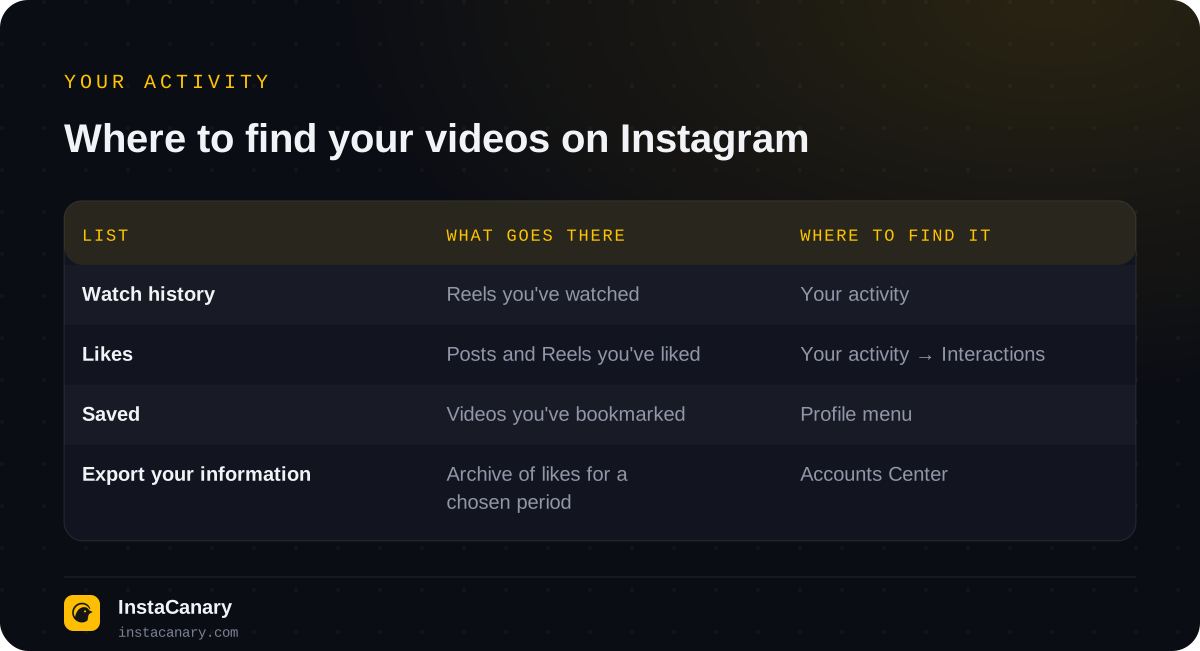
"Saved" is the third list, often confused with the first two. A video ends up there when you tap the bookmark icon under a post. It opens not from "Your activity" but from the profile menu: three lines → "Saved". Saved items can be sorted into collections, and they don't disappear over time.
All three lists are private. Neither the video's creator nor your followers can see what you watched or saved. Likes are different: only you see the "Likes" list itself, but each like is visible to the post's author and to everyone who opens the list of people who liked it.
Can you see someone else's liked videos?
No. Instagram has no separate list of other people's likes, and the "Following" tab, where you could once see what the people you follow were liking, was removed in 2019. You can't see another person's watch history either: it's available only to the account owner.
There are two partial ways left:
- The "Friends" tab in Reels. Since 2025 it shows videos that your mutual followers have liked or commented on. This way you can see some of the videos your friends liked, but only from those who haven't turned off sharing their activity in settings.
- A specific post. Under a post or Reel from a public account, you can open the list of likes and look for the person there. This works for one post, not for all of a person's likes at once.
Services and apps that promise to show "all the likes of any person" or "what a user watched" don't have that data. They usually ask for your Instagram username and password, and that's a risk of losing your account. We wrote about how to tell a safe service from a dangerous one in the article "Are anonymous Instagram viewers safe to use?".
What else is stored in "Your activity"
The "Your activity" section isn't just views and likes. In most versions of the app it also collects:
- Comments: everything you've written under other people's posts and your own, with the option to delete several at once.
- Story replies: the reactions and messages you sent in reply to stories.
- Recently deleted: your deleted posts, Reels and stories, which can be restored within 30 days (stories within 24 hours).
- Archived: your stories and posts that you hid from your profile but didn't delete.
All of this is data only about your own account. Instagram has no item where you could see the same lists for another person.
How to find old likes and views by downloading your data
If a video isn't in your watch history or in your likes feed, you can request an archive of your data. The path at the time of publication: settings → "Accounts Center" → "Your information and permissions" → "Export your information" (in some versions, "Download your information"). You can select only the categories you need, for example likes, and the period.
The archive isn't prepared instantly: Meta will send you a notification when the file is ready, and then you can download it. Inside are files with links to the posts you liked, with dates. It's inconvenient for a quick search, but it helps you find something really old.
How to watch other people's videos and stories without leaving a trace
A public account's posts and Reels can be watched without following, and the creator can't see who exactly watched them. Stories are different: if you open them from your own account, you end up in the viewers list. How that list works is explained in the article "Can you see who viewed your Instagram story?".
To watch a public profile's stories unnoticed, open the anonymous story viewer page and enter the username: you don't need an account of your own, and you won't be among the viewers. Private profiles can't be viewed this way.
In the Telegram bot you can watch stories and highlights of public profiles, download stories, Reels and posts, and get notifications about new posts. You don't need your Instagram password.
Watch stories anonymously → @InstaCanaryBot
FAQ
Does watch history include stories and regular posts?
No. Watch history collects Reels. Stories and feed photos you've viewed aren't saved to a separate list; you can only find them through a like or a save.
Will the creator know I removed their video from my watch history?
No. Your watch history is visible only to you, and changes to it aren't passed on to the creator in any way. The view in the video's counter stays.
Is watch history available on Instagram's web version?
The feature was launched in the mobile app for iPhone and Android. If the item isn't there in your browser, open the history from your phone.
Why isn't a Reel I definitely watched in my watch history?
Most often it's older than the period the history covers, or the creator deleted it. The video may also have been removed from the history by you manually or opened in an old version of the app.
Can friends see which Reels I liked?
Partly. In the "Friends" tab in Reels, mutual followers are shown videos you liked or commented on. You can turn this off in your privacy settings.
Read also
- Can You Hide Your Following on Instagram?You can't selectively hide following and followers, only make your account private. What strangers see, how to hide the lists from one person, and why "hide following" apps are dangerous.
- How to See When Someone Was Last Active on InstagramWhen someone was last active is shown only in Direct, and only if both of you have Activity Status turned on. Why it's sometimes not visible and how to hide that you're online.
- Can You See Who Viewed Your Reels on Instagram?Reels have no viewers list: the author only sees the number of views and insights without names. How Reels differ from stories and which actions are still noticeable.